A Fast, Free 3D Model Converter for STL, STEP, and GLB Files
Dextrous 3D Prints — Utility
3D Model Converter
DWG NO. CONV-002
REV B
REV B
Drop a file in, pick the output you need. Everything runs in your browser — files are never uploaded anywhere.
IN · OBJIN · STLIN · 3DS
IN · STEP/STPIN · IGES/IGSIN · FBX
OUT · STLOUT · OBJ
01 — Input
Drag & drop a model file
OBJ · STL · 3DS · STEP · IGES · FBX — max 25MB
02 — Preview
Triangles—
Vertices—
Source—
File size—
STEP/IGES imports are tessellated — curved surfaces get converted to triangles at import time (standard for any CAD→mesh conversion, same thing SolidWorks does when you export STL). Fine for printing; not for re-editing the parametric model.
FBX support uses three.js's official loader — geometry (vertices, faces, transforms) converts reliably. Animation, skeletons, and materials are ignored since they're irrelevant to a printable mesh. If an unusual or very old FBX export fails to parse, opening it in Blender and re-exporting as OBJ is the fallback.
Next Step
Got Your File Converted?
Let's Print It.
Send it straight to print — real prints from my own printer, checked and fixed by hand if anything needs it.
No File Yet?
Have an Idea Instead of a File?
Let's Design It From Scratch.
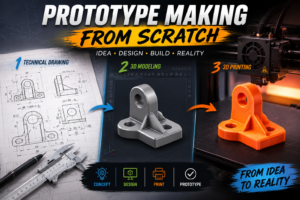
No model to convert yet — just an idea? I offer full industrial design, product development, and prototype making, from concept to a real, finished part.